No bank account is connected yet, or the connection has expired. Go to Profile → Connections.
Your dashboard: revenue, balance, and quick actions
The dashboard is your starting point: see revenue, bank balance, profit, and VAT at a glance, and jump straight to invoices, documents, and Bill.
The dashboard opens from Home in the bottom bar and shows the current year of your active business.
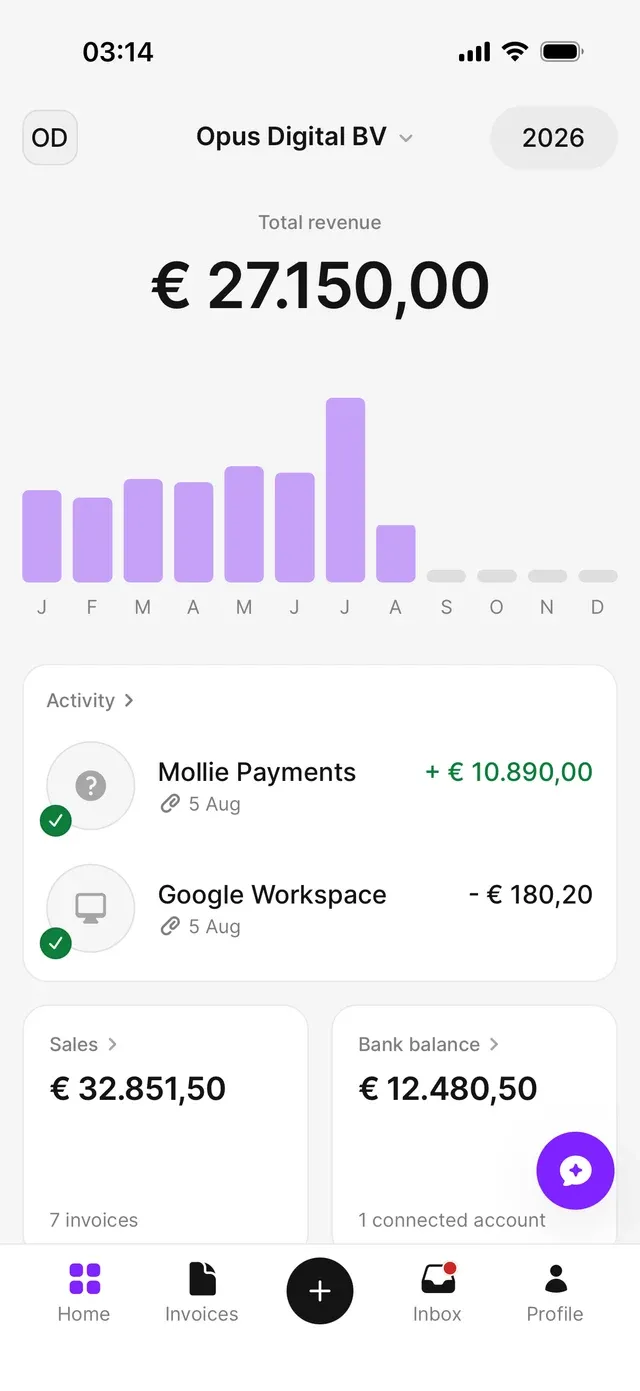
- Total revenue and chart — your revenue for the selected year, with a bar per month. Tap a month to focus on it; tap again for the year total.
- Activity — your two most recent entries. Tap the card for the full list; see View and filter your activity.
- Sales — the total of your sales invoices and how many there are.
- Bank balance — the combined balance of your connected accounts.
- Profit & loss — income minus expenses for the selected year.
- VAT Q… — the current VAT quarter, days remaining, and what you’re expected to get or pay.
- Documents — under Quick access, with the total in your administration.
- Ask Bill — opens the chat with your AI assistant.
Switching year or business
Tap the year at the top right to recalculate everything for another year. Tap the company name at the top to switch business — see Switch between businesses. The logo at the top left opens your Company info.
Before there’s any revenue
With no sales documents yet, the dashboard shows Add sales documents to view revenue and an Add invoice button: upload an existing sales document, or create a new invoice.
If your account isn’t fully set up, the Complete account setup card sits above it with the remaining steps — see Complete your account setup.
Common problems
The bank balance is zero or missing
You're looking at the wrong business's numbers
Check the company name at the top and switch if needed.
The chart stays empty
The chart covers the selected year only. Switch years at the top right.
Related articles
Can't find what you're looking for? Send us a message and we'll help you personally.
Contact support