No accountant is connected yet. The card lets you share a connection link — see Invite your accountant.
Your Inbox
One place for everything your accountant and Bill send you: questions, requests, and filings waiting for your approval.
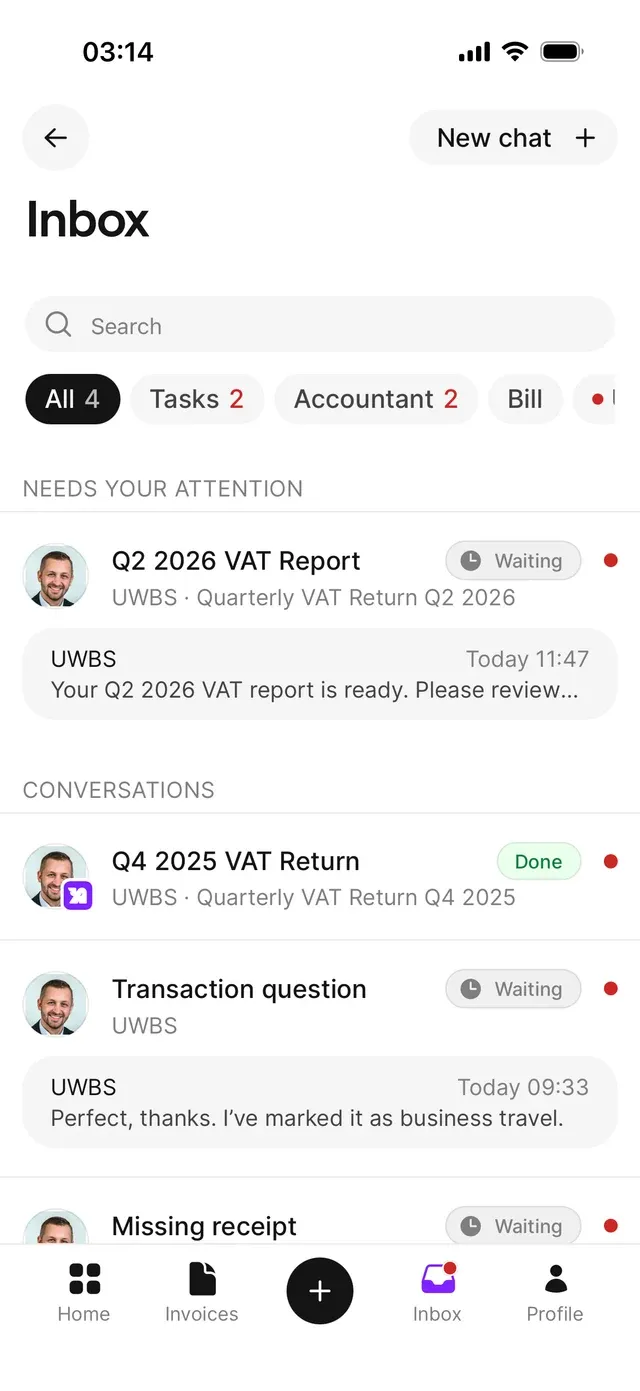
Open Inbox in the bottom bar. A red dot means something is unread. Two kinds of conversation come together here: those with your accountant and those with Bill about specific entries or documents.
Finding your way
Filter with the chips at the top — All, Tasks, Accountant, Bill — each with an unread counter, plus an Unread filter. Under All, open tasks are pinned above your conversations.
Each row shows the firm or conversation, a preview of the last message, and for tasks a status: Waiting while your response is needed, Done once it’s wrapped up. Opening a conversation marks it read.
Rows are linked to what they’re about: a conversation on an expense or income opens that entry; invoice and document conversations open the relevant list.
What to do here
- Answer questions from your accountant — see Conversations with your accountant.
- Approve or query a filing your accountant prepared, such as a VAT report or a payroll declaration.
Common problems
Your Inbox is empty apart from an invitation card
You're not getting notified about new messages
Check Profile → Notifications and enable the accountant messages category, and make sure AirBill may send notifications in your phone’s settings.
Related articles
Can't find what you're looking for? Send us a message and we'll help you personally.
Contact support