Open Inbox at the bottom. The report sits at the top under Needs your attention, with the Waiting label. Tap it to open the conversation.
Review and approve a VAT report
When your accountant prepares a VAT report for you, you review it in your Inbox and approve it with one button — or request a specific change.
Before you begin
- This review only appears when your accountant has prepared a report for you — there’s nothing to create yourself.
- Take a moment with the figures: your approval gives your accountant permission to file the report.
How to review and approve a report
-
Open the review in your Inbox
-
Review the report
The conversation contains the report your accountant prepared, with an accompanying message. Attached reports open right inside the conversation; the ⓘ button explains exactly what the buttons do.
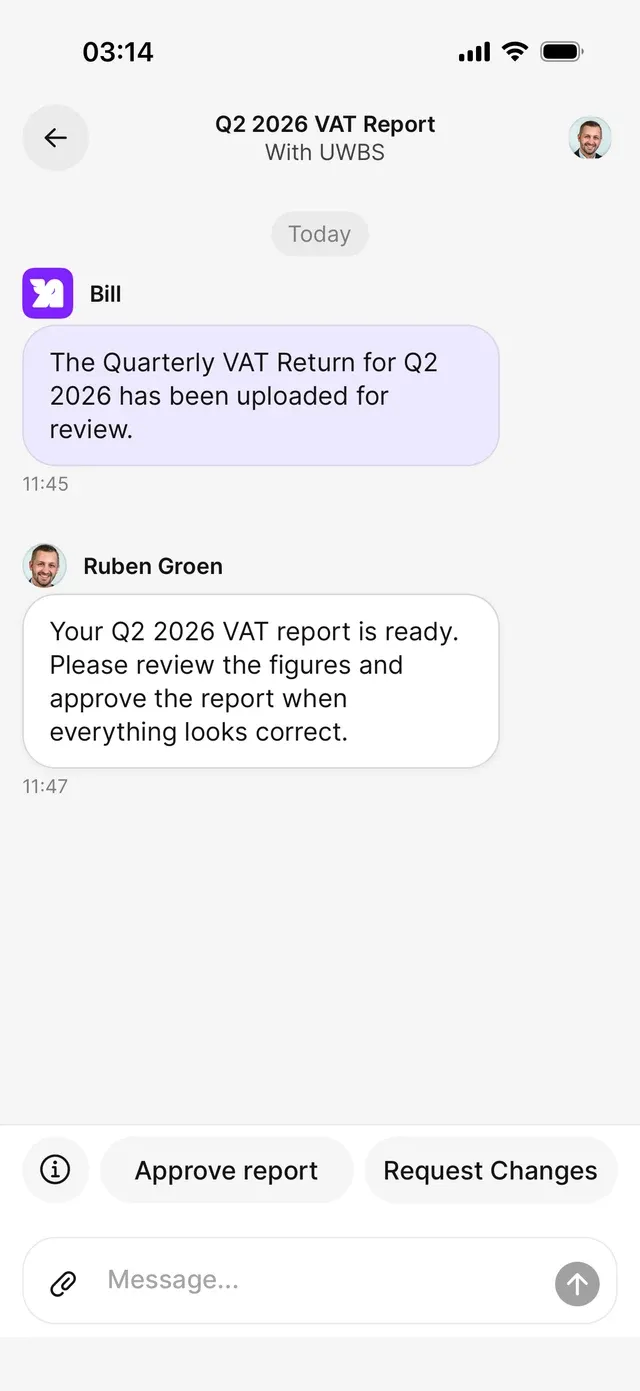
The review conversation: the report is ready, and at the bottom you choose between approving and requesting a change. -
Approve — or request a change
Everything correct? Tap Approve report and confirm. Your approval gives your accountant permission to file the report with the tax authority.
Something off? Choose Request changes and briefly describe what should be corrected — a comment is required, so your accountant knows exactly what’s up.
What happens next
- After approval the buttons disappear and you’ll see the status Report submitted for final approval; your accountant can then file the report.
- If you requested changes, your accountant adjusts the report and you receive the updated version for review in this same conversation.
- Once everything is wrapped up, the conversation gets the Done label in your Inbox.
Common problems
The buttons are gone
Then the review is already wrapped up — check the latest status in the conversation. A completed review can’t be changed; ask new questions in a new conversation.
Request changes won't submit
The comment can’t be empty. Describe in a sentence or two what should be corrected and send again.
You're unsure about the figures
Just ask in the conversation before approving — your accountant reads along and can explain or correct.
Related articles
Can't find what you're looking for? Send us a message and we'll help you personally.
Contact support